Advertisement

Find out the 8 top-rated AI tools for social media growth that can help you boost engagement, save time, and simplify content creation. Learn how these AI-powered social media tools can transform your strategy

Learn how ASR enhances customer service for CX vendors, improving efficiency, personalization, and overall customer experience

Explore how artificial intelligence improves safety, health, and compliance in manufacturing through smarter EHS systems.

How to convert string to a list in Python using practical methods. Explore Python string to list methods that work for words, characters, numbers, and structured data

Struggling with bugs or confusing code? Blackbox AI helps developers solve coding problems quickly with real-time suggestions, explanations, and code generation support

Looking for a better way to organize your email inbox? Clean Email helps you sort, filter, and declutter with smart automation and privacy-first tools

Discover how ChatGPT can help Dungeon Masters and players enhance their Dungeons and Dragons experience by generating NPCs, plot hooks, combat encounters, and world lore

Know how 5G and AI are revolutionizing industries, making smarter cities, and unlocking new possibilities for a connected future

How to handle NZEC (Non-Zero Exit Code) errors in Python with be-ginner-friendly steps and clear examples. Solve common runtime issues with ease

Looking for AI tools to make learning easier? Discover the top 12 free AI apps for education in 2025 that help students and teachers stay organized and improve their study routines

Learn how to build a GPT Tokenizer from scratch using Byte Pair Encoding. This guide covers each step, helping you understand how GPT processes language and prepares text for AI models

How Oppo’s Air Glass 3 XR brings AI-powered VR glasses to everyday life with smart features, sleek design, and seamless usability in real-world settings
Large language models have quickly moved from research labs to real-world applications. Whether it’s writing emails, summarizing text, coding, or offering answers in a chatbot, LLMs now handle tasks across industries. But here’s the catch: just building a model isn’t enough. You need to know how well it performs—consistently, accurately, and at scale. That’s where LangChain comes in. It’s not just a framework for building with LLMs—it helps measure how these models behave, so you're not flying blind.
When you're dealing with outputs generated by an LLM, you’ll notice something: even if the text sounds polished, it might not actually be correct. Traditional testing methods—like accuracy scores—only go so far. LLMs don’t operate like checkboxes. They generate open-ended responses, and those responses need context-aware evaluation.
Now, manually evaluating every output? That’s not realistic. You’d need a large team just to keep up with one model’s responses. Automation takes the load off and gives you structured, repeatable results. And that’s where LangChain shines.
LangChain doesn’t try to “fix” the model itself. Instead, it offers a system to run evaluations across different use cases and datasets, logging how the model performs in ways that humans would otherwise have to judge manually.
LangChain offers several evaluation tools that work with different kinds of tasks. Whether you're generating text, extracting information, or choosing between options, it gives you ways to see how the model's doing, without needing to eyeball everything yourself.
This is the most straightforward type. If your task has a clear expected output, like "Who is the CEO of Tesla?"—you can compare the model's answer to the correct one. Exact match or partial match checks can handle these.
This works well when answers are predictable. But for open-ended tasks like “Summarize this article” or “Write a short story,” you’ll need more.
This one’s about meaning rather than exact words. LangChain lets you compare outputs using embeddings, which are numerical representations of meaning.
If the model writes, "Tesla's CEO is Elon Musk," and the reference says, "Elon Musk leads Tesla," that's the same idea with different words. Embedding distance catches that. It checks how close the meanings are, not just the characters.
Here’s the part that really opens things up. LangChain can use another LLM to evaluate the first one's output. Think of it as peer review, but with another model.
You feed in a prompt, the model’s response, and the expected outcome, and the evaluator LLM gives you a score or explanation. It’s scalable, fast, and surprisingly reliable when set up correctly.
This approach is especially useful when testing things like coherence, relevance, or factual accuracy, where exact answers vary.
If none of the built-ins work for your case, LangChain lets you create your own. Let’s say you’re testing whether a chatbot follows company tone. You can design a script to rate tone adherence and plug it into the evaluation chain.
LangChain doesn’t box you into one way of thinking. You can mix and match evaluators based on the task—whether it's classification, QA, creative writing, or anything in between.
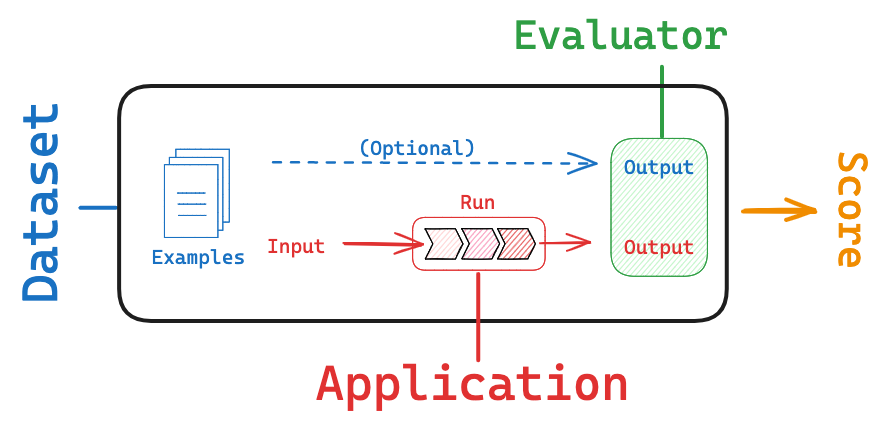
To automate evaluations using LangChain, you need three parts: inputs, expected outputs (when available), and evaluators. Here’s how the process unfolds in practice.
Start with clarity about what you’re evaluating. Is it a summarizer? A chatbot? A code generator? Each task needs a different type of evaluation.
For example:
You’ll need examples with inputs and, if possible, expected outputs. If you’re building a customer service bot, you might include sample questions and ideal responses.
LangChain works well with both labeled and unlabeled data. If you don't have a reference answer, evaluators like LLM-as-a-judge can still score performance based on prompts and guidelines.
LangChain provides ready-to-go evaluators for common tasks. But if your needs are specific—like tone matching, compliance checking, or UX-style ratings—you can write a simple Python function or use an LLM prompt-based evaluator.
Example:
python
CopyEdit
from langchain.evaluation import LLMQAEvalChain
eval_chain = LLMQAEvalChain.from_llm(llm)
results = eval_chain.evaluate(input="Who wrote Hamlet?", prediction="William Shakespeare", reference="William Shakespeare")
You get structured results like this:
json
CopyEdit
{
"score": "CORRECT",
"explanation": "The answer matches the reference exactly."
}
LangChain lets you run batch evaluations or test new outputs in real-time. Each run can be logged, compared, and analyzed. You can export scores, track trends over time, and even A/B test different prompts.
This isn’t just about one model. You can compare how GPT-4, Claude, or any other LLM handles the same inputs and stack up their scores side by side.
A lot of tools offer evaluation metrics, but LangChain makes them part of the development cycle. You can test, tweak, and retest without switching tools or rewriting your workflow.
It’s integrated. If you're already building apps or agents with LangChain, you don’t need to set up a separate pipeline for testing. The evaluation process fits right in.
It’s modular. You can swap in different models, evaluators, or metrics based on the project. You’re not locked into one method or platform.
And it scales. Whether you’re testing five prompts or five thousand, LangChain lets you automate the grunt work so your team can focus on improving quality, not just checking it.
LangChain doesn’t just help you build with LLMs—it helps you make sure what you’ve built actually works. Automating the evaluation process saves time, cuts down on human error, and makes it easier to spot weak points early.
If you're serious about building with language models, you can't afford to skip proper testing. And LangChain gives you a clean, structured way to do it, without turning it into a full-time job.
